I’m a developer, not a writer. But like most developers with a website, I’m still supposed to keep producing content for it blog posts, the occasional LinkedIn update, a thread on X and that’s the part I kept putting off. Every post meant re-reading my own site to get the details right, then trying to sound consistent, then second-guessing whether I’d stated something accurately. It was slow, and it pulled me away from the work I actually do.
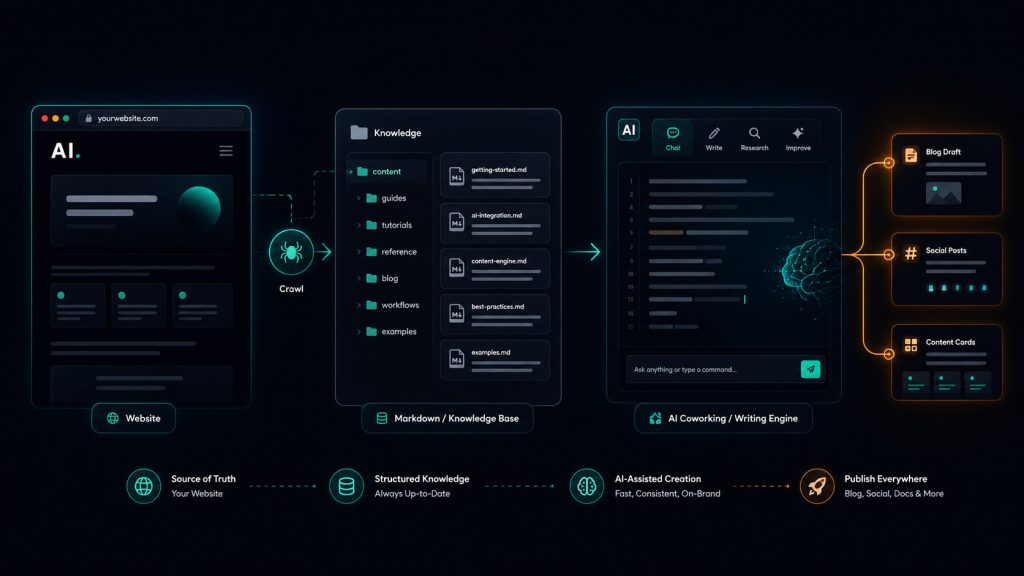
So I built a small engine to handle it. Not an app, not a SaaS just a folder of Markdown files and instructions that an AI agent reads before it writes anything. My website’s real content goes in as read-only source, gets distilled once into a structured knowledge base, and every future post is written from that knowledge instead of from scratch. The facts stay traceable to my actual site, and I never re-read the whole thing just to publish one post.
I built it for my own website. The structure isn’t locked to a single site you can point it at any site you own and add more later without their facts bleeding into each other but the point is automating content for your site, not running a content shop. This guide shows you how to build the same thing. It works whether you don’t write much and want the AI to handle it end to end, or you write perfectly well and just want to automate the day-to-day grind of it.
What you’ll need
The whole setup is just files plus an agent that can read and write them. Concretely:
- Claude Cowork. This is the piece that does the work. Cowork can read and write files in a folder on your computer and follow instruction files you leave for it, so it can build and then operate the engine. Anything that can read a directory of Markdown and follow
CLAUDE.md-style instructions will work, but the rest of this guide assumes Cowork. - Your website content as Markdown. The engine is only as good as the source you feed it. You need each page of the target site saved as a clean
.mdfile. - About an hour. Most of that is the one-time setup. After that, producing a post takes minutes.
No build step, no dependencies, no runtime. If you can make folders and paste text, you can build this.
Step 1: Scrape the website into Markdown
The engine treats your raw pages as the ground truth, the read-only source everything else traces back to. So the first job is getting the site into clean Markdown files, one per page.
I used Webclaw by Valerio Massimiani for this. It crawls a site and saves each page as a structured Markdown file, which is exactly the shape the engine wants. The repo has the installation guide and usage instructions: https://github.com/0xMassi/webclaw.
You don’t have to use Webclaw. If you’d rather not run a scraper, you can ask Claude (or any AI) to fetch your pages and save them as Markdown, or copy-paste each page in by hand. The only thing that matters is the end state: a folder of .md files that faithfully mirror the real site, with no invented detail. Whatever lands here becomes the source of truth, so keep it honest and keep it read-only once it’s in.
Aim for one file per meaningful page like home, about, services, work/case studies, contact, and each blog post or article. Keep the site’s own folder structure if it has one (e.g. wordpress/, laravel/) it makes the next step easier to reason about.
Step 2: Lay out the directory structure
Before the agent does anything, give it a place for everything. The structure is the engine it’s what keeps a site’s facts separate from its strategy, and (if you ever add more) one site separate from another. Here’s the full layout, with my own site (ahmadthedev-com) as the example:
AI-Content-Writer/
├── CLAUDE.md                      # Master rules: source-of-truth, workflows, file safety
├── README.md
│
├── shared/                       # Brand-neutral, reusable rules & workflows
│   ├── writing-rules.md          #   Baseline writing rules + banned AI/marketing tics
│   ├── post-formats.md           #   Generic structural skeletons for posts
│   ├── quality-checklist.md      #   Pre-publish gate every draft must pass
│   ├── content-generation-workflow.md
│   └── knowledge-maintenance-workflow.md
│
└── sites/                        # One isolated folder per website
    └── ahmadthedev-com/
        ├── CLAUDE.md             #   Site-specific instructions
        │
        ├── source/               #   Raw scraped pages — READ-ONLY ground truth
        │   └── website/
        │       ├── index.md
        │       ├── about.md
        │       ├── services.md
        │       ├── work/         #   case studies
        │       ├── wordpress/    #   articles, grouped as the site groups them
        │       └── ...
        │
        ├── knowledge/            #   Approved structured facts — the day-to-day source of truth
        │   ├── brand-summary.md
        │   ├── positioning.md
        │   ├── services.md
        │   ├── expertise.md
        │   ├── projects-and-proof.md
        │   ├── testimonials.md
        │   ├── target-clients.md
        │   ├── voice-and-style.md
        │   ├── content-pillars.md
        │   ├── content-gaps.md
        │   └── source-index.md   #   traceability map: source ↔ knowledge
        │
        ├── strategy/            #   content-strategy.md, platform-guidelines.md, topic-backlog.md
        ├── templates/          #   per-platform post templates + content brief
        └── output/             #   generated drafts
            ├── blog/
            ├── linkedin/
            ├── x/
            ├── facebook/
            └── drafts/
A few things worth understanding, because the whole engine rests on them:
The split between source/ and knowledge/ is the important one. source/ is the raw site — read-only, never edited, the thing every claim must be able to point back to. knowledge/ is what the agent actually writes from day to day: the same facts, but distilled, deduplicated, and organized so it doesn’t have to re-read the whole site for every post. The source-index.md file is the bridge it maps each knowledge claim back to the source page it came from, so nothing is untraceable.
shared/ holds the rules that don’t belong to any one brand — baseline writing rules, the pre-publish checklist, the workflows. Every site reuses these as-is. The per-site knowledge/voice-and-style.md is where a brand’s specific voice lives, and it overrides the shared tone rules.
And sites/ is deliberately plural. Even if you only have one site today, each website is a sealed box: facts, examples, voice, and proof from one never leak into another. If you ever add a second site a side project, a product, a friend’s site you just mirror this exact structure under a new sites/<name>/ folder and reuse shared/ untouched.
You don’t have to create all of this by hand. Make the top-level folders, drop your scraped pages into sites/<your-site>/source/, and let the agent build out knowledge/, strategy/, and the rest in the next step.
Step 3: The prompt that builds the engine
This is the part that does the heavy lifting. You point Claude Cowork at the folder, give it the source pages, and hand it one instruction: analyze the source and build the engine the structured knowledge base, the strategy, the templates, and the rules that will govern every future post.
The agent’s job here is one-time setup. It reads every page under source/, pulls out the real facts (services, positioning, projects, testimonials, voice), writes them into knowledge/ with references back to the source, flags anything thin or contradictory in content-gaps.md, and stands up the strategy and templates. Crucially, it stops and gives you a summary before mass-producing content so you can correct the foundation before anything is built on top of it.
Here’s the exact prompt I gave it. It’s long, and that’s deliberate the detail is what keeps the agent honest. To reuse it, swap ahmadthedev-com for your own site’s folder name, and replace the example questions (the “Who is Ahmad?” list near the end) with ones about your own brand:
You are working inside the `AI-Content-Writer` directory.

The root `CLAUDE.md` file already exists. Read it first and treat it as the main instruction file for this workspace.

Your task is to fully set up the first website workspace located at:

`sites/ahmadthedev-com/`

The raw scraped website content is located under:

`sites/ahmadthedev-com/source/website/`

## Objective

Build a robust, reusable content intelligence and content generation system for this website.

The system should allow Claude to:

* understand the website and brand
* extract reliable facts from the scraped content
* identify positioning, services, expertise, target clients, projects, proof, and gaps
* maintain a structured source of truth
* generate accurate, brand-aligned social media posts and long-form content later
* avoid repeatedly analyzing the full raw website for every content request
* prevent unsupported claims and hallucinations
* remain easy to update when the website changes
* scale to additional websites inside the `sites/` directory

## Your responsibility

Do not wait for me to define every file or instruction.

Inspect the existing workspace, determine what files, folders, instructions, knowledge documents, templates, workflows, and safeguards are required, then create them yourself.

You may:

* create new Markdown files
* create new directories
* improve the website-specific folder structure
* add website-specific Claude instructions
* add shared reusable instructions
* add content workflows
* add validation checklists
* add source indexes
* add content templates
* add strategy files
* add maintenance instructions
* add any other files you believe will make the system more reliable and scalable

Do not create unnecessary files. Every file should have a clear operational purpose.

## Core rules

1. Read the root `CLAUDE.md` before making changes.

2. Recursively inspect all files and subdirectories under:

   `sites/ahmadthedev-com/source/website/`

3. Treat the raw scraped website content as the primary source of truth for this initial setup.

4. Do not modify, rename, delete, or move raw files inside `source/website/`.

5. Separate clearly:

   * directly supported facts
   * reasonable interpretations
   * recommendations
   * missing information
   * conflicting claims
   * unsupported claims

6. Do not invent:

   * clients
   * projects
   * technologies
   * experience
   * outcomes
   * statistics
   * testimonials
   * revenue
   * conversion results
   * responsibilities
   * partnerships
   * job titles
   * business claims

7. When evidence is incomplete, record the gap instead of filling it with assumptions.

8. Keep this website's knowledge isolated from all other websites in the workspace.

9. Build the system so future content generation primarily uses approved structured knowledge, while raw source files remain available for verification.

10. Do not generate finished social posts during this setup task.

## System design expectations

Design a practical structure that separates at least these concerns, using whatever files and folders you consider best:

* raw source material
* extracted brand knowledge
* positioning
* services
* expertise
* target audiences
* buyer problems
* projects and proof
* career or experience history
* tone and writing style
* content pillars
* platform-specific writing guidance
* topic planning
* factual gaps and conflicts
* content generation workflow
* quality assurance
* source traceability
* update and maintenance workflow
* generated outputs

You are not limited to this list.

Add additional components when they materially improve reliability, maintainability, or content quality.

## Website-specific instruction file

Create or improve:

`sites/ahmadthedev-com/CLAUDE.md`

This file should teach future Claude sessions how to work with this website.

It should explain:

* what the workspace represents
* where source material is stored
* where approved knowledge is stored
* how to verify claims
* how to generate content
* how to handle missing evidence
* how to store outputs
* how to update knowledge after source changes
* what writing style to follow
* what language and behavior to avoid
* how to prevent information from other websites being mixed into this workspace

Write these instructions based on your analysis of the actual website rather than relying only on generic assumptions.

## Knowledge extraction

Create a structured internal knowledge base from the source content.

Choose the files and organization yourself.

The knowledge base should make it easy for a future Claude session to answer questions such as:

* Who is Ahmad?
* What is his current professional positioning?
* What services does he offer?
* What technologies does he actually have evidence for?
* Which capabilities are primary versus secondary?
* Who are his best-fit clients?
* What problems does he solve?
* What project examples and proof are available?
* What business outcomes are supported?
* What differentiates him?
* What claims are unclear or contradictory?
* What details are missing?
* What topics can safely be turned into content?
* What topics need more evidence first?

Preserve useful technical details that could later support educational posts, case studies, project stories, service posts, and founder-focused content.

Where practical, include relative source-file references so claims can be traced back to the scraped pages.

## Content system

Set up a reusable content-generation system for this website.

It should support at least:

* LinkedIn posts
* X posts and threads
* Facebook posts
* blog articles
* project stories
* technical lessons
* founder education
* agency partnership content
* service-awareness content
* professional opinion content

Create any reusable templates, workflows, checklists, content briefs, or metadata conventions needed.

The system should encourage content that is:

* clear
* practical
* technically credible
* useful to clients and decision-makers
* human in tone
* specific
* based on real experience and evidence
* commercially relevant without sounding overly sales-focused

Avoid:

* fake storytelling
* generic motivational writing
* excessive hype
* unsupported numbers
* repetitive hooks
* generic AI phrases
* overly polished corporate language
* unnecessary emojis
* forced calls to action
* phrases such as "Excited to announce"

## Shared workspace improvements

Inspect the existing `shared/` directory.

Create or improve shared files only when they are genuinely reusable across multiple websites.

Keep brand-specific instructions inside:

`sites/ahmadthedev-com/`

Keep shared rules brand-neutral.

You may update shared files if doing so does not conflict with the root `CLAUDE.md`.

Do not overwrite useful existing content without preserving or improving its intent.

## Source quality review

While analyzing the scraped Markdown, identify:

* duplicated navigation or footer content
* excessive whitespace
* scraping artifacts
* broken page structure
* missing pages
* empty pages
* repeated content
* conflicting claims
* outdated-looking information
* weak service descriptions
* unsupported claims
* missing case-study evidence
* missing target-client clarity
* source files that may need to be re-scraped

Record these findings in the system you create.

## Maintenance workflow

Add instructions for how this website knowledge should be updated later.

The workflow should cover:

* adding newly scraped pages
* detecting changed content
* updating structured knowledge
* preserving approved facts
* marking outdated claims
* reviewing contradictions
* avoiding unnecessary regeneration of everything
* keeping generated posts separate from source and knowledge files

## Decision-making authority

Use your judgment.

Do not ask me to approve each file before creating it.

Make sensible architectural decisions and complete the setup in one pass.

However:

* do not alter the raw source files
* do not generate finished social posts
* do not invent missing facts
* do not mix data from other website folders

## Final validation

Before finishing:

1. Review every file you created.
2. Confirm that internal paths are correct.
3. Confirm that the system is understandable to a future Claude session.
4. Confirm that factual claims can be traced to source material where practical.
5. Confirm that raw source files were not changed.
6. Remove unnecessary duplication between files.
7. Confirm that the system can scale to additional websites.
8. Confirm that future content can be generated without rereading the entire raw site every time.
9. Confirm that missing or conflicting information is clearly recorded.
10. Confirm that no finished social posts were generated.

## Final response

When complete, provide a concise summary containing:

* the structure you created
* the most important files added
* the current positioning you extracted
* primary target clients
* strongest services and expertise
* strongest available proof
* major content opportunities
* important missing information
* contradictions or source-quality problems
* any additional files or safeguards you added and why
* the recommended next task

Do not only describe what should be done. Perform the setup and create the files.
CLAUDE.md file:
# AI Content Writer Workspace

## Purpose

This workspace is used to analyze website content and generate accurate,
brand-aligned content for multiple websites and businesses.

Each website must remain isolated inside:

`sites/{site-name}/`

Never mix facts, positioning, services, examples, projects, target audiences,
or writing styles between websites.

## Workspace Structure

Each website may contain:

- `source/` — raw website pages and other source material
- `knowledge/` — structured facts extracted from the source material
- `strategy/` — content strategy, platforms, topics, and planning
- `output/` — generated posts, articles, and drafts
- `CLAUDE.md` — instructions specific to that website

Shared writing rules are stored in:

`shared/`

## Source-of-Truth Rules

1. Treat files inside a site's `source/` directory as raw source material.
2. Do not silently invent experience, results, clients, metrics, technologies,
   partnerships, testimonials, or project details.
3. Clearly label any inference that is not directly supported by the source.
4. Website-specific knowledge files must include source references wherever
   practical.
5. Never use information from one site when writing for another site.
6. When source files conflict, record the conflict instead of choosing a claim
   without evidence.
7. Prefer current and explicit statements over vague or duplicated statements.

## Knowledge-Building Workflow

Before generating content for a newly added website:

1. Recursively inspect all files under `source/`.
2. Create or update the structured files under `knowledge/`.
3. Identify duplicated, weak, conflicting, outdated, or unsupported claims.
4. Build content pillars and a topic backlog.
5. Stop and provide an analysis summary before producing a large content batch.

Do not repeatedly reread the full raw website for every post when the required
facts are already available in the site's structured knowledge files.

## Content Generation Workflow

Before writing a post:

1. Read the website-specific `CLAUDE.md`.
2. Read the relevant files in `knowledge/`.
3. Read the platform rules and content strategy.
4. Confirm that every factual claim is supported.
5. Write the draft in the relevant `output/` directory.
6. Run the draft through the shared quality checklist.

## File Safety

- Do not modify files inside `source/` unless explicitly instructed.
- Prefer creating or updating Markdown files.
- Do not overwrite approved content without preserving the previous version.
- Use clear, lowercase, hyphenated filenames.
- Include the date in generated post filenames.

Example:

`2026-06-27-wordpress-project-rescue.md`
A couple of notes on why it’s shaped this way. It tells the agent that source/ is read-only and the literal source of truth, so it can’t quietly invent a client or a metric to make a sentence flow better. It asks for a traceability map, so every fact in knowledge/ can be checked against the page it came from. And it forces a checkpoint an analysis summary before any large content batch, because the cheapest time to fix a wrong foundation is before you’ve written fifty posts on top of it.
Step 4: Run it, then write
Once the engine is built, day-to-day use is the easy part. To produce a post, you don’t dump the whole website at the agent again. You tell it which site and what you want, and it follows the workflow: read the site’s CLAUDE.md, read the relevant knowledge/ files, read the platform rules and the matching template, confirm every claim is supported, write the draft into the right output/ folder, and run it through the shared quality checklist before calling it done.
The result is content that’s fast to produce and honest by construction. The agent can only assert what the knowledge base supports, and the knowledge base traces back to the real site. When the website changes, you update source/, re-run the maintenance step to sync knowledge/, and carry on.
Why this beats “just ask the AI to write a post”
You could skip all of this and prompt an AI directly every time. People do, and it mostly works until it confidently states a service you don’t offer, inflates a project that never shipped, or invents a detail that simply isn’t on your site. The engine exists to make those failures structurally hard: read-only source, traceable knowledge, isolated sites, a checklist gate. It trades a little setup for content you don’t have to fact-check line by line.
Build it once, point it at your site, and you’ve got a content writer that actually knows what you do without you having to write each post yourself. Have fun building.