A credit-based billing system in Laravel looks simple on a whiteboard: users have a balance, actions cost credits, subtract on use. Then you ship it, and the real questions arrive. What happens when a user starts two big jobs at once? When a job dies halfway? When Stripe’s webhook and your success redirect race each other? I built the credit system for one of my recent Laravel SaaS apps a live product where every paid action is metered and this is the design that survived production.
The model: credits reset, they don’t roll over
Users don’t buy credits directly they subscribe to a plan, and each successful invoice resets their balance to the plan’s allotment. Yearly plans grant twelve months of credits at once. No rollover.
That’s a product decision as much as a technical one, and it simplifies everything downstream: the balance is one integer column on the user, renewed by the invoice.payment_succeeded webhook, and you never need to track credit expiry cohorts.
One service owns every rate
Every action has a cost finding a website, finding an email, pulling SEO metrics, sending an email. All of them are read from a single CreditService. Nothing else in the codebase is allowed to read the credit config directly.
This sounds like ceremony until the day you need to change a rate, audit every charge point, or answer “why was this user charged?” Then a grep for one class name gives you the complete answer.
The part that matters: on-hold reservations
Here’s the failure the naive design misses. A user has 100 credits and starts a discovery job estimated at 80. While it runs, they start another 80-credit job. Both pass the “balance >= cost” check. You’ve just sold 160 credits’ worth of work for 100.
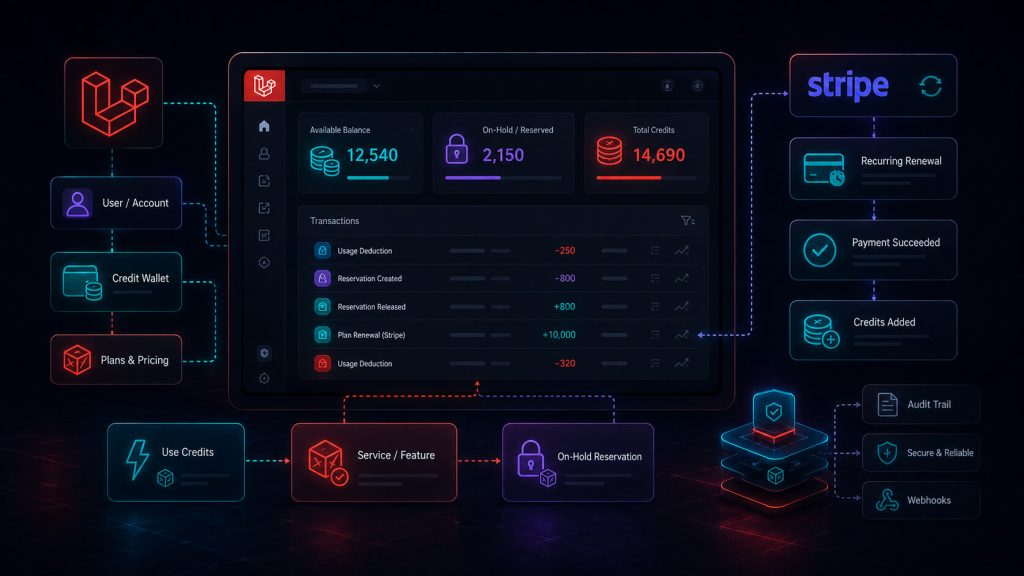
The fix is a reservation pattern. When a long-running job starts, it creates an activity row — type: consumed, status: pending — carrying the credit estimate. The user’s spendable balance is then calculated as:
php
public function getAvailableCredits(): int
{
    return max(0, $this->getRemainingCredits() - $this->getOnHoldCredits());
}
where on-hold credits are the sum of estimates on all pending and processing activities. The second job now sees 20 available credits, not 100, and is refused up front.
When the job finishes, it updates the activity with the actual amount used and marks it completed; an observer decrements the real balance exactly once. If the job fails outright, the charge is set to zero, the user doesn’t pay for work they didn’t get. One more detail I liked shipping: the discovery pipeline tries to deliver about 30% more results than requested but only ever charges for the requested count. Opportunistic generosity is cheap; the inverse destroys trust.
The edge cases production taught me
Reservations can leak. If a worker dies between pending and completed, the activity stays in processing and the user’s available balance looks smaller than it is. Retries recover most cases, but I documented this as a known gap with a planned cleanup job an honest reminder that the reservation pattern needs a garbage collector.
Renewal is a webhook concern, with a fallback. Credits are granted by the Stripe webhook, but the post-checkout redirect runs an idempotent fallback sync for the race where the user gets back before the webhook lands. Both paths key on the Stripe invoice ID, so the grant can only happen once. I’ve covered this in depth in the Stripe webhooks post.
Upgrades don’t grant credits mid-cycle. Plan changes prorate money through Stripe, but credits reset only on a successful invoice. Users notice. Decide this behaviour deliberately and put it in your pricing FAQ, because “I upgraded, where are my credits?” will otherwise become a support category.
Takeaway
A credit system is really three systems: a rate authority, a reservation ledger, and an idempotent grant pipeline. Build all three on day one retrofitting reservations onto a live balance column is far harder than starting with them. The wider context of this build is in my Laravel + FilamentPHP SaaS architecture post.